
Published 2026-09-05


A professional PDF generator that creates multilingual opening hours posters for retail stores from CSV data files. Built with Dart and PDFlib, this tool supports batch processing of multiple stores across different countries and languages.
This application generates professional A4 PDF posters displaying store opening hours information. It's designed for retail chains that need to produce localized opening hours signage across multiple countries and languages.
Key Capabilities:
✅ Template-Based Generation - Uses PDF templates with defined blocks for precise layout control
✅ Batch Processing - Process multiple CSV files containing multiple stores in one run
✅ Multi-Language Support - Supports NL, DE, FR, ES, IT, PL, PT, CS, SK, CA and more
✅ Country-Specific Backgrounds - Maps ISO codes to country-specific background pages
✅ CSV Parsing - Handles tab-delimited, comma-delimited, and quoted CSV files
✅ Encoding Support - Supports UTF-16LE, UTF-8, and other encodings
✅ Block Mapping - Flexible mapping between CSV fields and PDF template blocks
✅ Style Configuration - Configurable fonts, colors, sizes, and alignments per block
✅ Validation - Pre-flight validation of templates and required fields
✅ Error Handling - Comprehensive error messages with source file tracking
✅ Logging - Configurable logging to file for debugging and auditing
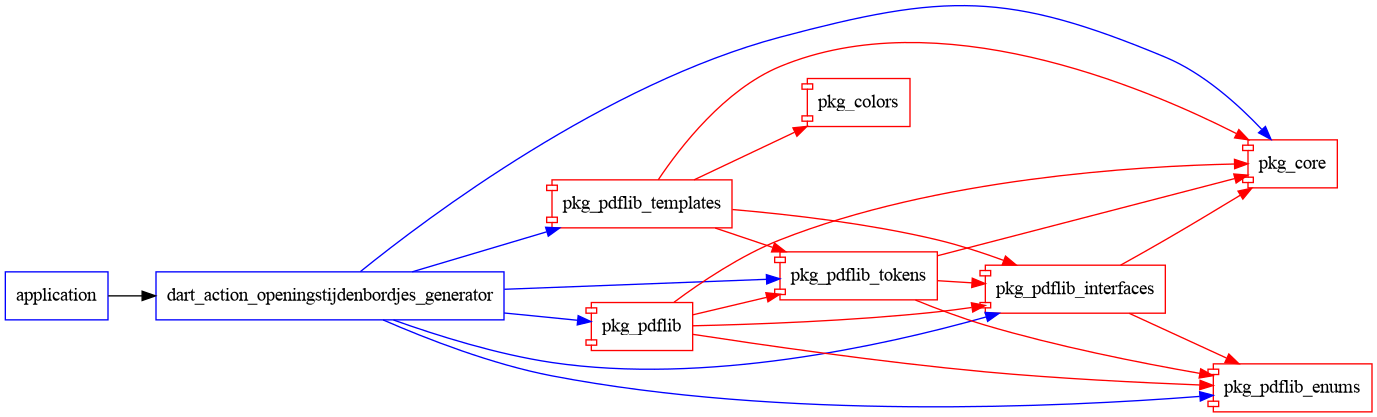
This project depends on local HH packages that must be available at:
/Users/Shared/work_dart/
├── pkg_core/
├── pkg_pdflib/
├── pkg_pdflib_interfaces/
├── pkg_pdflib_tokens/
├── pkg_pdflib_enums/
└── pkg_pdflib_templates/
Important: These packages are not published to pub.dev and must be available on your filesystem.
Ensure all HH packages are present:
ls -la /Users/Shared/work_dart/pkg_*
dart pub get
dart run bin/dart_action_openingstijdenbordjes_generator.dart --help
Generate PDFs from CSV files in the default location:
dart run bin/dart_action_openingstijdenbordjes_generator.dart
This will:
assets/csv_input/assets/teplates/A4_openingstijden-template.pdfassets/beeld/A4_openingstijden-landen.pdfassets/pdf_output/dart run bin/dart_action_openingstijdenbordjes_generator.dart \
--csv-dir /path/to/csv_files \
--pdf-dir /path/to/output \
--template /path/to/template.pdf \
--background /path/to/backgrounds.pdf
| Option | Short | Description | Default |
|---|---|---|---|
--csv-dir |
-c |
Directory containing input CSV files | assets/csv_input |
--pdf-dir |
-p |
Directory for generated PDF output | assets/pdf_output |
--template |
-t |
Path to PDF template file | assets/teplates/A4_openingstijden-template.pdf |
--background |
-b |
Path to background PDF (with country pages) | assets/beeld/A4_openingstijden-landen.pdf |
--help |
-h |
Display help message | - |
dart run bin/dart_action_openingstijdenbordjes_generator.dart
dart run bin/dart_action_openingstijdenbordjes_generator.dart \
  --csv-dir ~/Documents/store_data \
  --pdf-dir ~/Documents/posters
dart run bin/dart_action_openingstijdenbordjes_generator.dart \
  --template custom_template.pdf
dart run bin/dart_action_openingstijdenbordjes_generator.dart \
  --background ""
CSV filenames must follow this pattern:
Week [WeekNumber] - [ISO-Code] - A4-poster openingstijden [Year].csv
Examples:
Week 01 - nl-NL - A4-poster openingstijden 2025.csvWeek 05 - de-AT - A4-poster openingstijden 2025.csvWeek 12 - fr-BE - A4-poster openingstijden 2025.csvSupported encodings:
Supports both:
The CSV must contain at least 18 columns in this order:
| Column | Field Name | Description | Example |
|---|---|---|---|
| 1 | ISO | ISO language-country code | nl-NL |
| 2 | Vestiging | Store number | 6227 |
| 3 | Manager | Manager name | John Doe |
| 4 | Straat | Street address | Hoofdstraat 123 |
| 5 | Postcode | Postal code | 1234 AB |
| 6 | Plaats | City | Amsterdam |
| 7 | Land | Country code | NL |
| 8 | Taal | Language code | nl |
| 9 | Telefoon | Phone number | +31 20 1234567 |
| 10 | Monday | Monday hours | 08:00 - 18:00 |
| 11 | Tuesday | Tuesday hours | 08:00 - 18:00 |
| 12 | Wednesday | Wednesday hours | 08:00 - 18:00 |
| 13 | Thursday | Thursday hours | 08:00 - 18:00 |
| 14 | Friday | Friday hours | 08:00 - 20:00 |
| 15 | Saturday | Saturday hours | 09:00 - 17:00 |
| 16 | Sunday | Sunday hours | Gesloten |
| 17 | Uren achtervoegsel | Hours suffix | uur |
| 18 | Aantal | Quantity (number of copies) | 2 |
The following fields are mandatory and validated:
ISO	Vestiging	Manager	Straat	Postcode	Plaats	Land	Taal	Telefoon	Monday	Tuesday	Wednesday	Thursday	Friday	Saturday	Sunday	Uren achtervoegsel	Aantal
nl-NL	6227	Jan Smit	Hoofdstraat 1	1234 AB	Amsterdam	NL	nl	020-1234567	08:00 - 18:00	08:00 - 18:00	08:00 - 18:00	08:00 - 18:00	08:00 - 20:00	09:00 - 17:00	Gesloten	uur	2
nl-NL	6228	Piet Jansen	Kerkstraat 45	5678 CD	Rotterdam	NL	nl	010-7654321	09:00 - 17:30	09:00 - 17:30	09:00 - 17:30	09:00 - 17:30	09:00 - 21:00	10:00 - 16:00	12:00 - 17:00	uur	1
┌─────────────────┐
│   CSV Files     │
│  (Input Data)   │
└────────┬────────┘
         │
         ▼
┌─────────────────┐
│  CSV Reader     │
│   Service       │◄─── Charset Detection
└────────┬────────┘
         │
         ▼
┌─────────────────┐
│  Store Data     │
│    Models       │
└────────┬────────┘
         │
         ▼
┌─────────────────┐     ┌──────────────────┐
│ PDF Generator   │────►│ Template Loader  │
│   Service       │     │    Service       │
└────────┬────────┘     └────────┬─────────┘
         │                       │
         │                       ▼
         │              ┌──────────────────┐
         │              │  PDF Template    │
         │              │  (with blocks)   │
         │              └──────────────────┘
         │
         ▼
┌─────────────────┐     ┌──────────────────┐
│  Block Field    │────►│  Background PDF  │
│   Mapping       │     │  (Country Pages) │
└────────┬────────┘     └──────────────────┘
         │
         ▼
┌─────────────────┐
│  Output PDFs    │
└─────────────────┘
dart_action_openingstijdenbordjes_generator/
├── assets/
│   ├── beeld/
│   │   └── A4_openingstijden-landen.pdf    # Country-specific backgrounds
│   ├── csv_input/                          # Input CSV files
│   │   ├── Week 01 - nl-NL - A4-poster openingstijden 2025.csv
│   │   ├── Week 02 - de-AT - A4-poster openingstijden 2025.csv
│   │   └── ...
│   ├── pdf_output/                          # Generated PDFs (output)
│   ├── teplates/                            # PDF templates
│   │   └── A4_openingstijden-template.pdf
│   └── fonts/                               # Custom fonts
│       ├── Ubuntu-R.ttf
│       ├── Ubuntu-B.ttf
│       └── Arial.ttf
└── README.md                               # This file
The PDF template must contain the following named blocks:
| Block Name | Purpose | Style |
|---|---|---|
monday |
Monday hours | Ubuntu-B, 30pt, cyan |
tuesday |
Tuesday hours | Ubuntu-B, 30pt, cyan |
wednesday |
Wednesday hours | Ubuntu-B, 30pt, cyan |
thursday |
Thursday hours | Ubuntu-B, 30pt, cyan |
friday |
Friday hours | Ubuntu-B, 30pt, cyan |
saturday |
Saturday hours | Ubuntu-B, 30pt, cyan |
sunday |
Sunday hours | Ubuntu-B, 30pt, cyan |
slugline |
ISO - Store - City - Quantity | Arial, 10pt, black |
sidetext |
Store + City | Ubuntu-R, 6pt, black |
Styles are configured in lib/models/block_field_mapping.dart and include:
Example style string:
'fontname=Ubuntu-B fontsize=30 leading=135% shrinklimit=0 fillcolor={cmyk 1 .89 0 0} encoding=unicode'
ISO codes are mapped to background PDF page numbers in lib/utils/iso_page_mapping.dart:
'nl-NL': 1,  // Netherlands
'de-AT': 2,  // Austria
'de-DE': 3,  // Germany
'fr-BE': 4,  // Belgium (French)
'fr-FR': 5,  // France
// ... and more
PDFs are named using this convention:
Week_[WeekNumber]_[ISO-Code]_openingstijden_[Year].pdf
Examples:
Week_01_nl-NL_openingstijden_2025.pdfWeek_05_de-AT_openingstijden_2025.pdfWeek_12_fr-BE_openingstijden_2025.pdfEach PDF contains:
# Run all tests
dart test

# Run specific test suite
dart test test/unit/
dart test test/integration/
dart test test/acceptance/

# Run with verbose output
dart test --reporter=expanded
# Analyze code
dart analyze

# Format code
dart format .

# Fix common issues
dart fix --apply
Compile to native executable:
dart compile exe bin/dart_action_openingstijdenbordjes_generator.dart \
  -o pdf_generator
Then run:
./pdf_generator --csv-dir assets/csv_input
Logs are written to logs/app.log by default. Logging level can be adjusted in bin/dart_action_openingstijdenbordjes_generator.dart:
await setupLogger(level: Level.INFO); // INFO, FINE, WARNING, SEVERE
Error: [2902] PDFlib-Error: Invalid or expired license key
Solution: Ensure you have a valid PDFlib 10.x license key configured.
Error: [2516] PDF_create_textflow: Font 'Ubuntu-R' with encoding 'unicode': Font not found
Solution: Ensure font files exist in assets/fonts/ directory.
Error: Template validation failed: Required block 'monday' not found
Solution: Ensure your template PDF contains all required named blocks.
Error: CSV row must have at least 18 columns
Solution: Check your CSV file has all required columns. Verify delimiter (tab vs comma).
Error: STEP 3 FAILED: Missing required fields from [filename.csv]: ISO, Plaats
Solution: Ensure all required fields have values in your CSV.
timeout command (not available on macOS)/Users/Shared/work_dart/pkg_pdflib/bin/pdflib/macos/Fonts are searched in this order:
assets/fonts/~/.fonts//Library/Fonts/Copyright © 2024-2025 Huigh Averlag
All rights reserved.
This is proprietary software. Unauthorized copying, distribution, or use is strictly prohibited.
Contact: https://www.huighaverlag.nl
Generated by: dart_action_openingstijdenbordjes_generator v0.0.3
Last Updated: November 14, 2025
