
Published 2026-10-07
copied due to outdated dependencies.









A Flutter package for obtaining better feedback. It allows the user to provide interactive feedback directly in the app, by annotating a screenshot of the current page, as well as by adding text.
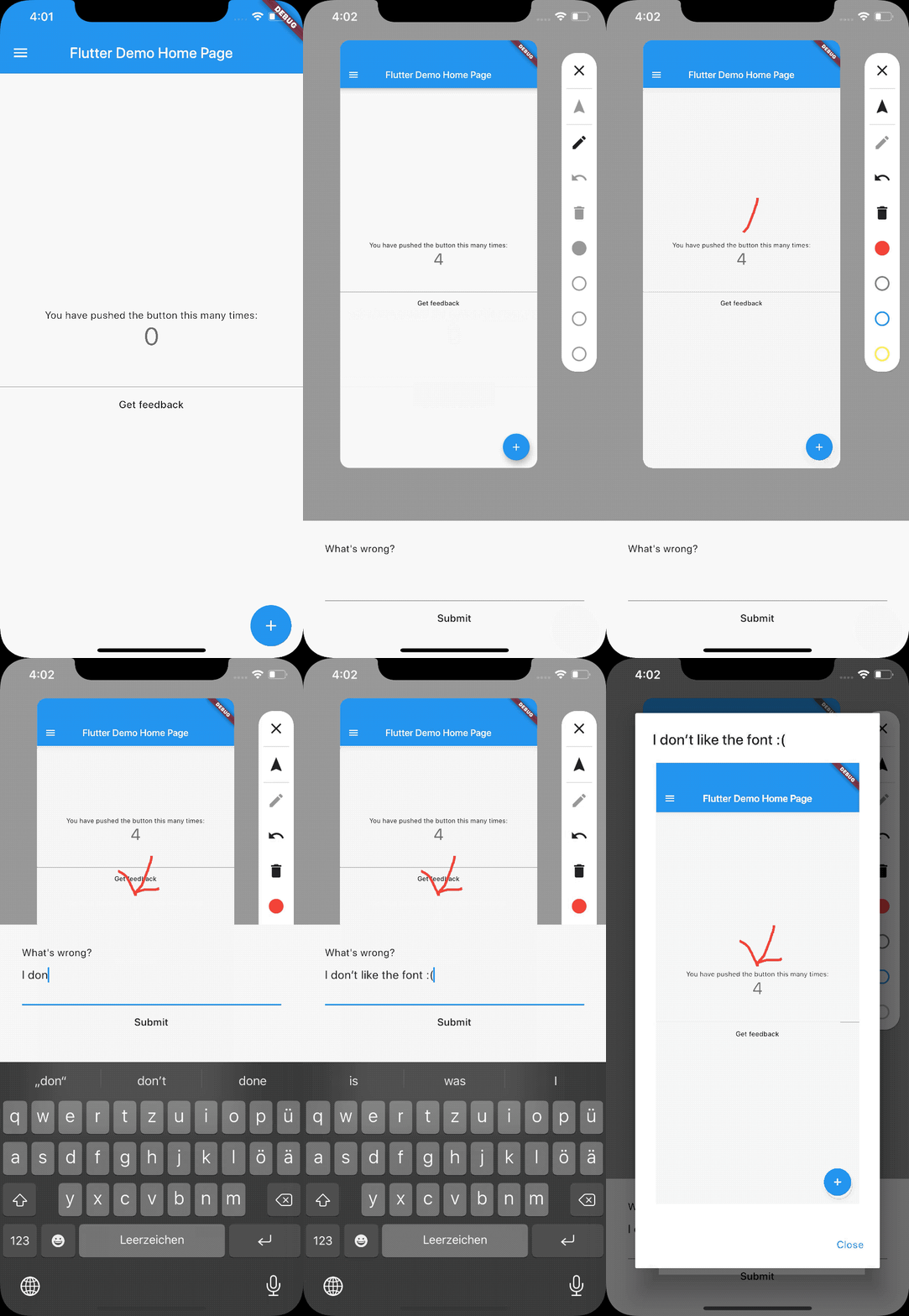
An interactive web example is available here: 
It is often quite hard to achieve a very good user experience. The most important aspect of creating a good user experience is to obtain and to listen to feedback of your user. Focus groups are one solution to this problem but it is quite expensive. Another solution is to use this library to obtain direct feedback of your users. This library is lightweight and easy to integrate and makes it really easy for your users to send valuable feedback to you.
By obtaining the feedback with an annotated image it is much easier for you get a good understanding of your users problem with a certain feature or screen of your app. It is like the saying "A picture is worth a thousand words" because a textual description can be interpreted in many ways which makes it harder to understand.
First, you will need to add feedback to your pubspec.yaml.
The latest version is .
dependencies:
  flutter:
    sdk: flutter
  feedback: x.y.z # use the latest version found on pub.dev
Then, run flutter pub get in your terminal.
If you're using Flutter for Web, you have to build the project with
flutter build web --web-renderer canvaskit. For more information on the CanvasKit renderer please look into Flutters documentation.
Just wrap your app in a BetterFeedback widget.
To show the feedback view just call BetterFeedback.of(context).show(...);.
The callback gets called when the user submits his feedback.
import 'package:feedback/feedback.dart';
import 'package:flutter/material.dart';

void main() {
  runApp(
    BetterFeedback(
      child: const MyApp(),
    ),
  );
}
Provide a way to show the feedback panel by calling
BetterFeedback.of(context).show((UserFeedback feedback) {
  // Do something with the feedback
});
Provide a way to hide the feedback panel by calling BetterFeedback.of(context).hide();
Depending on your use case there are wide variety of solutions. These are a couple suggestions:
The feedback_gitlab plugin creates an issue on GitLab for each feedback submitted by the users.
Just use it as shown in the following example. It openes the feedback ui and after the user has submitted his feedback, it gets automatically uploaded to GitLab.
import 'package:feedback_gitlab/feedback_gitlab.dart';

BetterFeedback.of(context).showAndUploadToGitLab(
    projectId: 'project-Id', // Required, use your GitLab project id
    apiToken: 'api-token', // Required, use your GitLab API token
    gitlabUrl: 'gitlab.org', // Optional, defaults to 'gitlab.com'
);
The API token needs access to read_api and write_repository.
See GitLabs docs
for more information on API tokens.
The feedback_sentry submits the feedback to Sentry as Sentry User Feedback. It works with sentry and sentry_flutter.
Just use it as shown in the following example. It openes the feedback ui and after the user has submitted his feedback, it gets automatically uploaded to Sentry.
import 'package:feedback_sentry/feedback_sentry.dart';

BetterFeedback.of(context).showAndUploadToSentry(
    name: 'Foo Bar', // optional
    email: 'foo_bar@example.com', // optional
);
| Target | Notes |
|---|---|
| Upload to a server | To upload the feedback to a server you should use for example a MultipartRequest. |
| Share via platform share dialog | share_plus on pub.dev. Also shown in the example. |
| Firebase | Firestore, Cloud Storage, Database |
| Jira | Jira has a REST API to create issues and upload files |
| Trello | Trello has a REST API to create issues and upload files |
| You can use the users email client like in the sample app to send feedback to yourself using the flutter_email_sender plugin. |
If you have sample code on how to upload it to a platform, I would appreciate a pull request to the example app.
import 'package:feedback/feedback.dart';
import 'package:flutter/material.dart';
import 'package:flutter_localizations/flutter_localizations.dart';

void main() {
  runApp(
    BetterFeedback(
      child: const MyApp(),
      theme: FeedbackThemeData(
        background: Colors.grey,
        feedbackSheetColor: Colors.grey[50]!,
        drawColors: [
          Colors.red,
          Colors.green,
          Colors.blue,
          Colors.yellow,
        ],
      ),
      localizationsDelegates: [
        GlobalMaterialLocalizations.delegate,
        GlobalCupertinoLocalizations.delegate,
        GlobalWidgetsLocalizations.delegate,
        GlobalFeedbackLocalizationsDelegate(),
      ],
      localeOverride: const Locale('en'),
    ),
  );
}
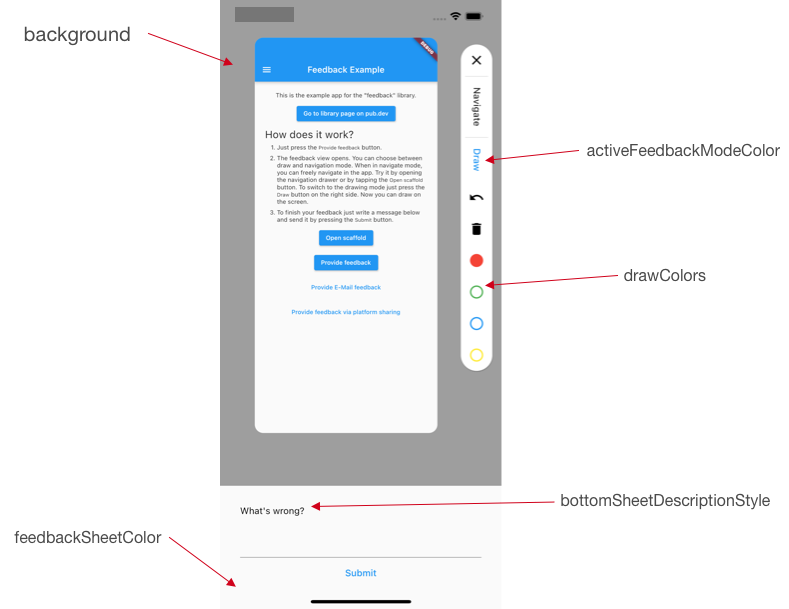
How the properties of FeedbackThemeData correspond to the view can be seen in the following image.
You can customize the localizations as follows.
Create your own implementation of FeedbackLocalizations or subclass one of
the existing translations, if you just want to change one or two texts.
Then create your own GlobalFeedbackLocalizationsDelegate and pass it to
BetterFeedback.
class CustomFeedbackLocalizations implements FeedbackLocalizations {
  // ...
}

class CustomFeedbackLocalizationsDelegate
    extends GlobalFeedbackLocalizationsDelegate {
  static final supportedLocales = <Locale, FeedbackLocalizations>{
    // remember to change the locale identifier
    // as well as that defaultLocale (defaults to en) should ALWAYS be
    // present here or overridden
    const Locale('en'): const CustomFeedbackLocalizations(),
  };
}

void main() {
  runApp(
    BetterFeedback(
      child: const MyApp(),
      localizationsDelegates: [
        GlobalMaterialLocalizations.delegate,
        GlobalCupertinoLocalizations.delegate,
        GlobalWidgetsLocalizations.delegate,
        CustomFeedbackLocalizationsDelegate(),
      ],
    ),
  );
}
BetterFeedback. To prevent this you have to set useRootNavigator in showDialog to false.Hey, I'm Jonas Uekötter. I created this awesome software. Visit my GitHub profile and follow me on Twitter. If you like this, please leave a like or star it on GitHub.
You can raise issues here.
If you've got a question do not hesitate to ask it here.
Contributions are also welcome. You can do a pull request on GitHub here. Please take a look at up for grabs issues first.
Version bump from 3.2.0 to 3.2.1 (material_ui -> 1.1.0 (was 1.0.1)).
Hebrew translations
Bangla translations
Fixed an issue with focus on web (https://github.com/ueman/feedback/pull/359)
Bump to Flutter 3.24 and Dart 3.5
meta dependencyfeedbackBuilderBetterFeedback.of() now returns a FeebdackController instead of FeedbackData. This should be non-breaking change for most users.THIS IS A BREAKING CHANGE
BetterFeedback.of() returns an instance or throwsBetterFeedback.of().show() gives an instance of UserFeedbackconsoleFeedbackFunction and alertFeedbackFunctionBetterFeedback.pixelRatio)This is the first non-beta version.
